
WIN
Windows
Olders Retro 7.4 v1.0. You must use the client to connect directly to the server.













Download the client and complementary resources. Choose your operating system below. The full map is also available with installation instructions.
Olders Retro 7.4 v1.0. You must use the client to connect directly to the server.
Use PlayOnMac to run Windows software on macOS.
Use CodeWeavers (CrossOver) to run Windows software on Linux.
Get the complete map using the file and follow the guide below to install.
Step 1: Log in with your character at least once.
Step 2: Download the FULL Map.
Step 3: Press WinKey + R to open the Windows Run dialog and type:
%appdata%/otclientv8/Olders Retro
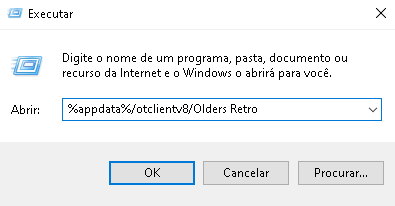
Step 4: With the client closed, replace the minimap772.otmm file in the folder with the one you just downloaded.
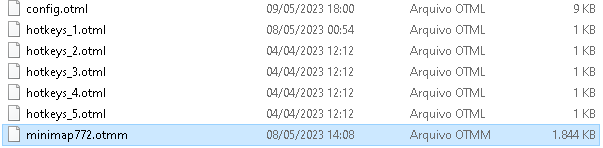
Congratulations! The full map has been installed successfully.


| 1. | Lord Burdox | LvL 101 |
| 2. | Koak | LvL 92 |
| 3. | Rycerzs Ninja | LvL 88 |
| 4. | Trevor | LvL 86 |
| 5. | Desireed | LvL 83 |
| 6. | Binho Pai De Familia | LvL 81 |
| 7. | Theo Ftv | LvL 77 |
| 8. | Teacher | LvL 74 |
| 9. | Maria Liduina | LvL 74 |
| 10. | Carapassa De Grilo | LvL 72 |
| 1. | Sunrise | LvL 53 |
| 2. | Rooker | LvL 43 |
| 3. | Flampex | LvL 35 |
| 4. | Zora | LvL 32 |
| 5. | Chema Venegaz | LvL 17 |
| 1. | Amassa Coitado | 12 kills |
| 2. | tapaporcimadacara | 12 kills |
| 3. | Espanca Esquerda | 10 kills |
| 4. | We don't mind | 3 kills |
| 5. | Valhalla | 2 kills |
| 6. | Kings Of Power | 1 kills |
| 7. | 0 kills |